

Introduction
I'm finally back with this time a tutorial series on writing modern red team agents aka malware/backdoor. I choose this name "Modern Virus Writing Guide" from the infamous article back in 90s called "Belly Belcebu's Virus Writing Guide" published in 29A zine #3 and #4. Since then, many articles published with similar name back in days. If you don't know this article, I would recommend you to read it.
So, it is a plan for long series where we will go from single hello world to reverse shell to reflective DLL injection, transacted hollowing, advanced EDR evasion techniques and much more.
So, buckle up and let's get started
Disclaimer: This series is for educational and security research purposes only. If you're a red teamer, malware analyst, or security researcher, this is the kind of knowledge you need to do your job well. If you're planning to use this for anything malicious, this isn't for you. Close the tab.
Want To Go Deeper? Advanced Malware Development & EDR Evasion Training
If you want a more comperhensive approach. We have created a complete program for malware developement & EDR evasion.
"Advanced Malware Development & EDR Evasion"
This is a live instructor-led training where we go very deep into building malware that can bypass EDR detections with melleable C2, execution of cobaltstrike-like BOFs and much more. With tons of process injection techniques, new researches I'm publishing in different conferences this year and next year and much more.
It is mainly created for security teams right now. Please reach out to us at "maltrak.com/contact"
Table of Contents
- Why Assembly? And Why Should You Care?
- What You Need
- The Basics: Registers, Stack, and Calling Conventions
- Hello World in x64 Assembly
- Writing a DLL in Assembly
- Process Injection: The Big Picture
- What's Next?
Why Assembly? And Why Should You Care?
We will be using x64 assembly for the next couple of tutorials and many tutorials to come. We will start from absolute scratch. So don't worry if you haven't touched it before.
If you are asking "Why assembly?"
Here's the thing. Assembly is the cloest language you can ever have to the actual CPU and windows. Using this language is absolutely essential for most of the bypass techniques we will cover.
From shellcode development, process injection, reflective DLL injection, process hollowing. EDR evasion and anti-reverse engineering techinques.
We will use C++ when it comes to actual malware development part like communicating with C&C server, executing commands and so on.
What You Need
Before we get started, you need a few tools on your Windows machine. Nothing fancy, no expensive IDE needed.
UASM Assembler. This is the successor to MASM with proper x64 support and better macros. MASM technically supports x64, but UASM has nicer features like option win64:7 that handle the x64 calling convention automatically. You can grab it from the UASM GitHub releases. Download the 64-bit binary.
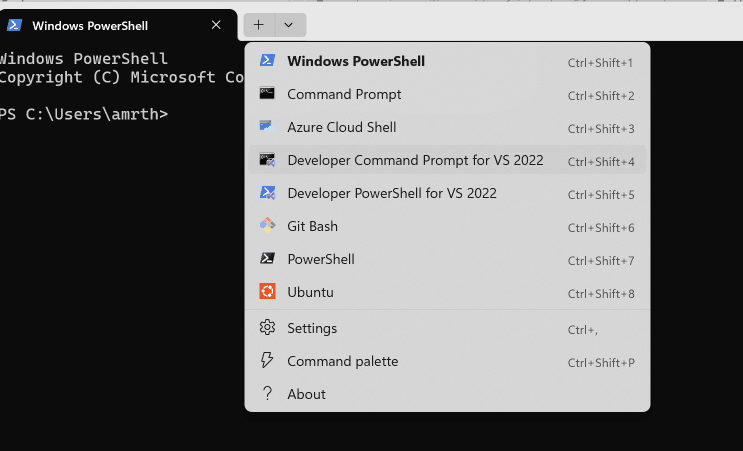
MSVC Compiler & Linker (cl.exe & link.exe). These come from Visual Studio Community Edition. Download its installer and select the "Desktop development with C++" option. That gives you all the C++ tools needed. After installation, use the "x64 Native Tools Command Prompt" shortcut to get a command prompt with all the right paths set up.
Windows Includes for Assembly These are bunch of files that includes all windows commands' names (aka APIs), windows structures and much more. "You can download them from here"
(Optional) VS Code: This is my favorite editor that does include an extension called "x86 and x86_64 Assembly" that will provide you with color highlighting for x64 assembly syntax
Once you have those, make sure uasm32.exe or uasm64.exe and link.exe are accessible from your command prompt. Once you install Visual Studio Community editiion
The Basics: Registers, Stack, and Calling Conventions
Before we write any code, you need to understand three fundamental concepts. If you already know these, feel free to skip ahead to the Hello World section. But if assembly is new to you, read this carefully. Everything else builds on top of these concepts.
What Are Registers?
Registers are like tiny variables (like X, Y or Z) that are embedded inside your CPU chip. They are extremely fast and the processor knows exactly how to reach them. they are limited in numbers and size. So, we will use them wisely.
They are meant for every step execution not a long storage place. Think of it as the top of your shelf not a drawer. The drawers in this case is your RAM and the archive is your hard drive. In x64 (64-bit) mode, each register is 64 bits wide, meaning it can hold a number up to 2^64 (or a memory address, since on x64, pointers are 64 bits). Here are the main registers you need to know:
General-purpose registers:
| Register | Common Use |
|---|---|
| RAX | Return value from functions. Also used for multiplication/division. |
| RBX | General purpose. Often used as a base pointer for data. |
| RCX | Used as a counter for loops and sometime as the 1st argument to a function or a windows command like sin(X), it will store the X value |
| RDX | 2nd function argument. Also used in multiplication/division. |
| RSI | Represent the pointer to the source string for string operations. |
| RDI | Represent the pointer to the destination string for string operations. |
| RBP | Points to the base of the current stack frame. Quite important for local variables |
| RSP | Stack pointer. Always points to the top of the stack. Very special one, we will explain the stack more later |
| R8 | 3rd function argument. |
| R9 | 4th function argument. |
| R10-R15 | General purpose. Only exist in x64 world. |
A few things to note here. When I say "1st function argument," I mean specifically in the Microsoft x64 function calling convention (which is what Windows uses). Linux uses a different convention. We'll talk more about this in a minute.
As well, each of these 64-bit registers can be accessed in smaller pieces. For example, RAX is the full 64-bit register. EAX is the lower 32 bits of RAX. AX is the lower 16 bits. AL is the lowest 8 bits, and AH is the next 8 bits above AL. This matters because sometimes you're working with data that's only 32 bits or 8 bits wide, and you use the smaller names to access just that portion.
Here's a visual to help:
|<----- RAX (64 bits) ----->|
                |<-- EAX -->|  (lower 32 bits)
                    |<-AX->|  (lower 16 bits)
                    |AH|AL |  (upper/lower 8 bits of AX)
The same pattern applies to RBX (EBX, BX, BH, BL), RCX (ECX, CX, CH, CL), and RDX (EDX, DX, DH, DL). The R8-R15 registers use a slightly different naming: R8D for the lower 32 bits, R8W for the lower 16, R8B for the lowest 8.
Special registers you should know about but won't directly manipulate (yet):
- RIP: The instruction pointer. It always points to the next instruction the CPU will execute. You can't just
MOVa value into it (you use JMP or CALL to change it). - RFLAGS: Contains status flags. After a CMP or arithmetic operation, flags like ZF (zero flag), CF (carry flag), and SF (sign flag) get set. Conditional jumps (JE, JNE, JG, etc.) check these flags.
Memory
Outside of the registers, you have a massive virtual memory. 4 GB for 32-bit applications and 256 TB for 64-bit applications. You can use it however you like. Allocate a space and save a variable there.
The issue that you will face is where are you going to store this variable? in which place exactly? Whatever the place you choose, you willl need to store the pointer somehow.
If you say "okay, I will use another place to store the pointer", now you got yourself into another issue of where to store the 2nd pointer and so on.
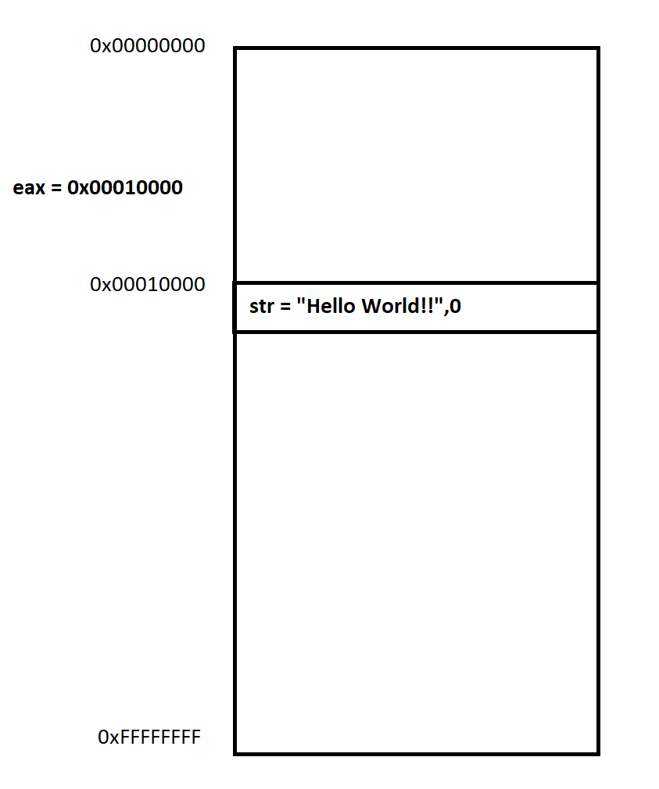
One of the solutions to this issue is the stack
The Stack
The stack is a region of memory that your program uses for temporary storage. Every function call uses the stack. Local variables live on the stack. Function arguments (sometimes) live on the stack. Return addresses live on the stack. It's critical.
Here's the key concept: The stack is LIFO (Last in first one) type of system. You have RBP and RSP pointing to the beginning and the end of it. (RBP mostly moves to different places in the middle). And all your local variables, arguments, math calculations and return addresses stored in the middle.
PUSH and POP are the two basic stack instructions:
PUSH RAXdoes two things: first it subtracts 8 from RSP (making room, moving RSP up), then it writes the value of RAX to the memory location RSP now points to.POP RAXdoes the reverse: it reads the value at the memory location RSP points to, puts it in RAX, then adds 8 to RSP.
On x64, every PUSH/POP operates on 8 bytes (64 bits) because that's the native word size.
Stack frames. Every time you call a function, a new "stack frame" is created. The stack frame holds the return address (where to go back to when the function finishes), the function's local variables, and any saved registers. When the function returns, its stack frame is cleaned up and RSP goes back to where it was before the call.
This is why buffer overflows are so dangerous. If you write past a local variable's buffer, you overwrite the return address on the stack. When the function returns, it jumps to whatever address you wrote there. That's the fundamental concept behind stack-based exploitation.
x86 vs x64: What Changed
If you've read any older Win32 assembly tutorials (like Billy's guide), you'll see a lot of push instructions before function calls. That's because on 32-bit Windows, the STDCALL calling convention passes all arguments on the stack.
For example, calling MessageBoxA(0, "Hello", "Title", 0) in 32-bit STDCALL looks like this:
; 32-bit STDCALL: push arguments right-to-left
push 0                  ; uType (4th arg)
push offset szTitle     ; lpCaption (3rd arg)
push offset szMessage   ; lpText (2nd arg)
push 0                  ; hWnd (1st arg)
call MessageBoxA        ; callee cleans up the stack
Every argument gets pushed onto the stack, right-to-left. The callee (MessageBoxA) cleans up the stack before returning. Simple, but slow because every argument involves a memory write.
x64 is different. Microsoft's x64 calling convention passes the first four arguments in registers:
| Argument | Register |
|---|---|
| 1st | RCX |
| 2nd | RDX |
| 3rd | R8 |
| 4th | R9 |
Anything beyond four arguments goes on the stack (at RSP+32, RSP+40, etc.).
But here's the catch that trips everyone up: shadow space. Even though the first four arguments are in registers, the caller must allocate 32 bytes (4 x 8 bytes) of space on the stack before every CALL. This is called "shadow space" or "home space." The callee is allowed to spill (save) those register arguments into this space. The callee doesn't have to use it, but the space must be there.
On top of that, the stack must be 16-byte aligned before the CALL instruction executes. Since CALL pushes an 8-byte return address, the stack is misaligned by 8 bytes when you enter a function. So you often need to subtract an extra 8 bytes (or include it in your shadow space allocation) to keep things aligned.
Here's what that same MessageBoxA call looks like in x64:
; x64 Microsoft calling convention
sub rsp, 28h            ; 32 bytes shadow space + 8 bytes alignment
xor r9d, r9d            ; uType = 0 (4th arg) (xor anything with itself returns zero)
lea r8, [szTitle]       ; lpCaption (3rd arg)
lea rdx, [szMessage]    ; lpText (2nd arg)
xor ecx, ecx            ; hWnd = 0 (1st arg)
call MessageBoxA
add rsp, 28h            ; clean up the stack (caller cleans up in x64)
Arguments go in registers, not on the stack. The caller allocates and cleans up the shadow space (not the callee like in STDCALL). And we need that 0x28 (40 bytes = 32 shadow + 8 alignment) adjustment.
Don't worry too much about doing this manually. UASM's invoke macro handles shadow space and alignment automatically when you set option win64:7 at the beginning of your code. But you absolutely need to understand what it's doing underneath, because when you write shellcode in Part 3, you'll be managing all of this yourself.
I know the code look scary, but bit a bit you will get everything. So, please stay with me for a bit, everything will make sense.
Common Instructions You Need to Know
Here are the instructions you'll see over and over again. Each one does something simple. Assembly isn't complicated, it's just very verbose. What takes one line in C takes five lines in assembly.
| Instruction | What It Does | Example |
|---|---|---|
MOV dst, src | Copies the value from src to dst. | mov rax, 42 (put 42 into RAX) |
ADD dst, src | Adds src to dst, stores result in dst. | add rax, 5 (RAX = RAX + 5) |
SUB dst, src | Subtracts src from dst, stores result in dst. | sub rsp, 28h (reserve 40 bytes on stack) |
XOR dst, src | Bitwise XOR. XORing a register with itself sets it to zero. | xor eax, eax (fastest way to zero out RAX) |
CMP a, b | Compares a and b by subtracting, sets flags, discards result. | cmp rax, 0 (is RAX zero?) |
JMP label | Unconditional jump. Go to that label. | jmp myLoop |
JE label | Jump if equal (ZF=1). Used after CMP. | je done (jump to "done" if equal) |
JNE label | Jump if not equal (ZF=0). | jne keepGoing |
CALL label | Push return address, jump to label. | call MyFunction |
RET | Pop return address, jump to it. Returns from a function. | ret |
PUSH src | Decrement RSP by 8, write src to stack. | push rbx (save RBX on stack) |
POP dst | Read from stack into dst, increment RSP by 8. | pop rbx (restore RBX from stack) |
LEA dst, [src] | Load Effective Address. Calculates an address without accessing memory. | lea rax, [rbx+8] (RAX = address of RBX+8) |
TEST a, b | Bitwise AND, sets flags, discards result. | test rax, rax (is RAX zero?) |
NOP | No operation. Does nothing. Used for alignment or padding. | nop |
A few tips on these:
XOR EAX, EAX is the standard way to zero out a register. It's faster and smaller than MOV RAX, 0. You'll see it everywhere. As well, notice I wrote EAX not RAX. On x64, writing to a 32-bit register (EAX) automatically zeros the upper 32 bits of the full 64-bit register (RAX). So xor eax, eax effectively zeros all of RAX in fewer bytes.
LEA is weird at first. It looks like a memory access but it isn't. LEA RAX, [RBX+RCX*4+10] just does the math (RBX + RCX*4 + 10) and puts the result in RAX. It never touches memory. It's basically a fast way to do address arithmetic, and compilers use it all the time for regular math too.
TEST RAX, RAX is the idiomatic way to check if a register is zero. It's equivalent to CMP RAX, 0 but takes fewer bytes. You'll see it after API calls to check if the return value is NULL.
Hello World in x64 Assembly
Alright, you've got the theory. Let's write some actual code. We'll start with the classic: a MessageBox that says "Hello World" and then exits. Simple, but it teaches you the x64 assembly skeleton that every program in this series builds on.
Here's the full program:
; ============================================================
; hello.asm - Hello World in x64 Assembly
; Displays a MessageBox and exits cleanly
; Part of the Modern Virus Writing Guide series
; ============================================================

.x64                        ; Generate 64-bit code
option casemap:none         ; Case-sensitive labels
option frame:auto           ; Auto-generate stack frame/unwind info
option win64:7              ; Microsoft x64 calling convention handling

; -------------------------------------------------
; API prototypes: declare the Windows APIs we call
; QWORD = 64-bit (pointers, handles on x64)
; DWORD = 32-bit (flags, simple integers)
; -------------------------------------------------
MessageBoxA PROTO :QWORD, :QWORD, :QWORD, :DWORD
ExitProcess  PROTO :DWORD

; -------------------------------------------------
; Data section: our null-terminated strings
; -------------------------------------------------
.data
    szTitle   db "Hello from x64 ASM", 0
    szMessage db "Welcome to the Modern Virus Writing Guide!", 0

; -------------------------------------------------
; Code section: where our instructions live
; -------------------------------------------------
.code

; start - Program entry point
; Shows a MessageBox then exits with code 0
start PROC FRAME
    ; Display a message box
    ; MessageBoxA(hWnd, lpText, lpCaption, uType)
    ; hWnd = 0 (no parent window)
    ; uType = 0 (MB_OK, just an OK button)
    invoke MessageBoxA, 0, ADDR szMessage, ADDR szTitle, 0

    ; Exit the process cleanly
    invoke ExitProcess, 0
start ENDP

end start
Let me walk you through every piece of this.
The x64 skeleton. The first four lines are your boilerplate. You'll copy these into every program:
.x64tells the assembler to generate 64-bit code. Without this, you'd get 32-bit output.option casemap:nonemakes labels case-sensitive. This matters because Windows API names are case-sensitive:MessageBoxAis different frommessageboxA.option frame:autotells UASM to automatically generate proper stack frame setup and unwind information for your PROCs. On x64, Windows requires proper unwind data for structured exception handling to work. Without this, your program might crash in unexpected ways if an exception occurs.option win64:7enables Microsoft x64 calling convention handling. The number 7 is a bitmask that controls how UASM manages shadow space, stack alignment, and register argument passing for you. With this option and theinvokemacro, you don't have to manually manage any of that.
PROTO declarations. These tell the assembler about the functions you're going to call and their parameter types. Think of them like function declarations in C. In x64, pointer-sized values are QWORD (64-bit) because pointers are 8 bytes. Standard integers, flags, and similar values are DWORD (32-bit). The handle parameter (HWND) for MessageBoxA is QWORD because handles are pointer-sized on x64.
The .data section. This is where you define your initialized data (strings, constants, etc.). The db directive means "define bytes." Each string is a sequence of ASCII bytes followed by a 0 (null terminator). When you see db "Hello", 0, it's defining 6 bytes: H, e, l, l, o, and a null byte.
PROC FRAME. This declares a function (procedure) with proper stack frame and unwind information. The FRAME keyword tells UASM to set up the unwind data that Windows needs. Every function that calls other functions should use PROC FRAME on x64.
invoke. This is UASM's high-level macro that handles the x64 calling convention for you. When you write invoke MessageBoxA, 0, ADDR szMessage, ADDR szTitle, 0, UASM generates all the code to put arguments in the right registers (RCX, RDX, R8, R9), allocate shadow space, align the stack, make the CALL, and clean up afterward. It's doing all that messy work from the "x86 vs x64" section automatically.
ADDR. This gives you the address of a variable, similar to the & operator in C. ADDR szMessage means "the memory address where szMessage is stored."
Assembling and Linking
Save the code as hello.asm and run these two commands:
uasm64 -c -Zp8 hello.asm
link hello.obj /SUBSYSTEM:WINDOWS /ENTRY:start kernel32.lib user32.lib
The first command assembles your source code into an object file (hello.obj). The -c flag means "compile only, don't link." The -Zp8 flag sets 8-byte structure alignment (the default for x64).
The second command links the object file into an executable. /SUBSYSTEM:WINDOWS tells the linker this is a GUI application (not a console app). /ENTRY:start specifies that our start procedure is the entry point. kernel32.lib and user32.lib are import libraries that resolve our API calls (ExitProcess is in kernel32, MessageBoxA is in user32).
Run hello.exe and you should see a MessageBox pop up with "Welcome to the Modern Virus Writing Guide!" and an OK button. Click OK and the program exits.
Congratulations. You just wrote your first x64 assembly program.
Writing a DLL in Assembly
Now let's build a DLL. This is important because we are going to inject DLLs inside other processes later on.
What Is a DLL?
A DLL (Dynamic Link Library) is basically an EXE that doesn't run on its own. Instead, it gets loaded into another process's memory space. When it's loaded, the code inside it runs within that process.
Programs use DLLs to share code. For example, kernel32.dll contains hundreds of Windows API functions that every program uses. Instead of each program having its own copy of those functions, they all load kernel32.dll and call the shared code.
The key difference between an EXE and a DLL: an EXE has a single entry point that runs when you launch it. A DLL has a special entry point called DllMain that Windows calls automatically at specific moments (loading, unloading, thread creation, thread destruction). As well, a DLL can export functions that other programs can call by name.
DllMain and Reason Codes
Every DLL has a DllMain function. Windows calls this function with a fdwReason parameter that tells you WHY it was called:
- DLL_PROCESS_ATTACH (1): The DLL is being loaded into a process. This is the big one. This is when your initialization code runs. When a process calls
LoadLibrary("mydll.dll"), your DllMain gets called with this reason. - DLL_PROCESS_DETACH (0): The DLL is being unloaded from a process (either because the process is exiting or someone called
FreeLibrary). - DLL_THREAD_ATTACH (2): A new thread is being created in the process that loaded this DLL.
- DLL_THREAD_DETACH (3): A thread is exiting in the process that loaded this DLL.
For malware, DLL_PROCESS_ATTACH is almost always what you care about. That's the moment your DLL gets loaded into a target process, and that's when your payload code should run.
DllMain must return TRUE (1) to indicate successful initialization. If you return FALSE (0), the system will unload the DLL and the LoadLibrary call in the loading process will fail.
The Export Table
A DLL can export functions that external code can call. When you build a DLL, the linker creates an export table inside the PE file that maps function names to their addresses. Other programs (or tools like rundll32) can look up functions by name in this export table and call them.
rundll32.exe is a built-in Windows utility that loads a DLL and calls one of its exported functions. Attackers use it all the time because it's a legitimate, signed Microsoft binary. Running your DLL through rundll32 doesn't look suspicious in process listings. It just looks like another rundll32 instance.
Building Our DLL
Here's a complete DLL with a DllMain entry point and an exported function called Execute that shows a MessageBox:
; ============================================================
; mydll.asm - x64 DLL with DllMain and an exported function
; The Execute export can be called via rundll32 for testing
; Part of the Modern Virus Writing Guide series
; ============================================================

.x64
option casemap:none
option frame:auto
option win64:7

DLL_PROCESS_ATTACH EQU 1

; -------------------------------------------------
; API prototypes
; -------------------------------------------------
MessageBoxA PROTO :QWORD, :QWORD, :QWORD, :DWORD

; -------------------------------------------------
; Data section
; -------------------------------------------------
.data
    szTitle   db "DLL Loaded", 0
    szMessage db "Execute function called!", 0

; -------------------------------------------------
; Code section
; -------------------------------------------------
.code

; -----------------------------------------------------------
; DllMain - Entry point for the DLL
; Called by Windows when the DLL is loaded/unloaded
; Parameters:
;   hInstDLL   - Handle to the DLL module
;   fdwReason  - Reason code (ATTACH/DETACH)
;   lpReserved - Reserved
; Returns TRUE (1) to indicate success
; -----------------------------------------------------------
DllMain PROC FRAME hInstDLL:QWORD, fdwReason:QWORD, lpReserved:QWORD
    mov rax, 1          ; Return TRUE (successful initialization)
    ret
DllMain ENDP

; -----------------------------------------------------------
; Execute - Exported function, callable via rundll32
; Follows the rundll32 calling convention:
;   hwnd        - Window handle (unused)
;   hinst       - Module handle (unused)
;   lpszCmdLine - Command line string (unused)
;   nCmdShow    - Show command (unused)
; Shows a MessageBox to prove the DLL loaded and ran
; -----------------------------------------------------------
Execute PROC FRAME hwnd:QWORD, hinst:QWORD, lpszCmdLine:QWORD, nCmdShow:DWORD
    invoke MessageBoxA, 0, ADDR szMessage, ADDR szTitle, 0
    ret
Execute ENDP

end DllMain
A few things to point out. The EQU directive defines a constant. DLL_PROCESS_ATTACH EQU 1 is like #define DLL_PROCESS_ATTACH 1 in C. We define it but don't actually use it in this simple example because our DllMain just returns TRUE regardless of the reason code. In a real scenario, you'd check fdwReason against this constant.
The Execute function follows the rundll32 export convention. When rundll32 calls an exported function, it passes four parameters: a window handle, a module instance handle, a command line string, and a show command integer. We don't use any of them here. We just show the MessageBox.
The end DllMain line tells the assembler that DllMain is the DLL entry point. This is what gets called when the DLL is loaded.
Assembling, Linking, and Testing
To build the DLL:
uasm64 -c -Zp8 mydll.asm
link mydll.obj /DLL /ENTRY:DllMain /EXPORT:Execute user32.lib kernel32.lib
The /DLL flag tells the linker to produce a DLL instead of an EXE. The /EXPORT:Execute flag adds the Execute function to the DLL's export table so it can be called by name from outside. The linker will produce mydll.dll along with mydll.lib (an import library) and mydll.exp (export file).
To test it, use rundll32:
rundll32 mydll.dll,ExecuteYou should see the "Execute function called!" MessageBox. If you do, your DLL is working. This is exactly how rundll32 is used in the wild, and it's one of the techniques attackers use to execute DLL payloads through a legitimate, signed Windows binary.
The fact that rundll32 is a trusted system process is exactly why it's attractive for malware. "Living off the land" techniques like this abuse built-in Windows tools to execute malicious code without dropping a suspicious executable.
Process Injecton
Now you know how to build a DLL, let's inject it in a process somewhere.
Process Enumeration with Toolhelp32
Before you can inject into a process, you need to find it. If your target is notepad.exe or explorer.exe, you need to know its Process ID (PID). The standard way to enumerate running processes on Windows is the Toolhelp32 APIs.
The Toolhelp32 APIs
There are three functions you need:
CreateToolhelp32Snapshot. This takes a "snapshot" of the system at a moment in time, capturing information about all running processes, threads, modules, or heaps (depending on the flags you pass). We pass TH32CS_SNAPPROCESS (value 2) to get a snapshot of all processes. It returns a handle to the snapshot.
Process32First. Takes the snapshot handle and a pointer to a PROCESSENTRY32 structure. It fills the structure with information about the first process in the snapshot. Returns TRUE if it succeeds, FALSE if the snapshot is empty.
Process32Next. Same as Process32First but moves to the next process. You call this in a loop until it returns FALSE (meaning there are no more processes).
The pattern is simple: create a snapshot, get the first entry, loop through the rest.
The PROCESSENTRY32 Structure
Each process in the snapshot is described by a PROCESSENTRY32 structure. On x64, this structure is 304 bytes. Be careful here, because the x64 version has a dwReserved0 field that adds extra padding compared to what some older documentation shows. If you get the struct size wrong, Process32First will fail.
The key fields you care about:
| Field | Offset (x64) | Description |
|---|---|---|
dwSize | 0 | Must be set to 304 (size of the struct) before calling Process32First |
th32ProcessID | 8 | The process ID (PID) |
szExeFile | 44 | The executable name (null-terminated string, MAX_PATH characters) |
The first thing you MUST do before calling Process32First is set dwSize to the size of the structure. Windows checks this field, and if it's wrong, the call fails. This is a common gotcha.
The Enumeration Loop
Here's the conceptual pattern in assembly:
; Create a snapshot of all running processes
; TH32CS_SNAPPROCESS = 2, second param 0 = all processes
invoke CreateToolhelp32Snapshot, 2, 0
mov hSnapshot, rax          ; Save the snapshot handle

; Initialize PROCESSENTRY32 struct
; CRITICAL: dwSize must be set to 304 (x64 struct size)
mov dword ptr [pe32], 304

; Get the first process entry
invoke Process32First, hSnapshot, ADDR pe32

; Loop through all processes
.While rax != 0
    ; pe32 + 8 = th32ProcessID (the PID)
    ; pe32 + 44 = szExeFile (the process name)
    ;
    ; Here you would compare szExeFile with your target
    ; process name (e.g., "notepad.exe") using a string
    ; comparison, and save the PID if it matches

    ; Get the next process entry
    invoke Process32Next, hSnapshot, ADDR pe32
.EndW

; Close the snapshot handle when done
invoke CloseHandle, hSnapshot
Here the .While and .EndW are used to loop on the all processes one by one until Process32Next returns in the rax zero. Rax always represents the return value from any function or API. So, .While rax != 0 means repeat that code as far as rax remains not equal to zero. If its value becomes zero, exit the loop.
Process Injection: The Big Picture
Now we get to the fun part. You've found your target process, you have its PID. How do you get your code running inside it?
What Is Process Injection?
Process injection is the technique of running your code inside another process's address space. Instead of your malware running as its own process (which is visible in Task Manager and easy to spot), it runs inside a legitimate process like explorer.exe or svchost.exe.
Why does this matter? Because security tools monitor processes. If your malware is running as evil_malware.exe, that's suspicious. But if your code is running inside svchost.exe, it blends in with normal system activity. Your network connections, file access, and registry operations all appear to come from a trusted system process.
There are many injection techniques (process hollowing, APC injection, thread hijacking, etc.), but the classic one, the one everyone learns first, is DLL injection.
The Classic DLL Injection Chain
DLL injection forces another process to load your DLL. When Windows loads a DLL into a process, it calls that DLL's DllMain with DLL_PROCESS_ATTACH. So if you can make explorer.exe load mydll.dll, your DllMain code runs inside explorer.exe. Simple concept.
Here's the chain of API calls, step by step:
Step 1: OpenProcess. Get a handle to the target process using its PID. You need specific access rights: PROCESS_CREATE_THREAD (to create a thread), PROCESS_VM_OPERATION (to allocate memory), and PROCESS_VM_WRITE (to write data). Or just use PROCESS_ALL_ACCESS if you don't care about being subtle.
handle = OpenProcess(PROCESS_ALL_ACCESS, FALSE, targetPID)If this fails, you probably don't have sufficient privileges. You might need to run as Administrator.
Step 2: VirtualAllocEx. Allocate a chunk of memory inside the target process. You need enough space to write the full file path of your DLL (something like C:\Users\user\Desktop\mydll.dll). The allocated memory needs to be readable and writable.
remoteBuffer = VirtualAllocEx(handle, NULL, pathLength, MEM_COMMIT, PAGE_READWRITE)This returns a pointer to the allocated memory, but that pointer is in the TARGET process's address space, not yours.
Step 3: WriteProcessMemory. Write your DLL path string into the memory you just allocated inside the target process.
WriteProcessMemory(handle, remoteBuffer, dllPath, pathLength, NULL)At this point, the string "C:\path\to\mydll.dll" exists somewhere in the target process's memory.
Step 4: CreateRemoteThread. Create a new thread in the target process. The thread's start function is LoadLibraryA, and the parameter is the pointer to the DLL path you wrote in step 3.
CreateRemoteThread(handle, NULL, 0, LoadLibraryA_addr, remoteBuffer, 0, NULL)When that thread starts, it calls LoadLibraryA("C:\path\to\mydll.dll") inside the target process. Windows loads your DLL, calls DllMain, and your code is now running in another process.
Why does LoadLibraryA's address work across processes? You might be wondering: I got the address of LoadLibraryA in MY process. Can I use that address in the TARGET process?
Yes, here's the thing. kernel32.dll is loaded at the same base address (same place) in every user-mode process on a given boot session. ASLR is a security technology that randomizes the base addresses of all libraries at boot time, but once the system is running, every process gets kernel32 (and other libraries) at the same location.
So the address of LoadLibraryA in your process is the same as in the target process. This is a well-known property of how Windows maps system DLLs, and it's what makes this injection technique work.
How Does This Get Detected?
This technique is the "Hello World" of process injection. Every security product on the planet knows about it. Here's why it gets caught:
Import table analysis. All the APIs you just used are saved inside a table in your program called Import Table. If your binary imports OpenProcess, VirtualAllocEx, WriteProcessMemory, and CreateRemoteThread, that combination is a massive red flag. Static analysis tools will flag this immediately. (That's why we need to perform dynamic API calling and multiple string encryptions, will be covered in the next tutorial)
Kernel callbacks. The Windows kernel provides notification mechanisms that EDRs can use. It provides multiple ways for the EDR to register itself and get notified when any of these events happen
EDR can use these notifications to detect this process injection:
-
PsSetCreateThreadNotifyRoutinenotifies registered drivers whenever a thread is created in any process. Creating a remote thread triggers this callback, and the EDR can see that process A is creating a thread in process B (remote thread), which is a red a flag. (We can avoid it with process hollowing and multiple callback process injections, we will cover them in future tutorials) -
ObRegisterCallbackslets drivers monitor handle operations. When you callOpenProcesswith suspicious access rights, the EDR gets notified and can inspect (or block) the handle. Many false positives here which makes us not too verbose. (We can avoiding that through handle duplication based OpenProcess. It will be covered later) -
Lastly,
PsSetLoadImageNotifyRoutinewhich lets drivers monitor loaded libraries inside any process. It will get your DLL file and scan it before it gets loaded into this new process. (We can avoid it through Reflective DLL injection & Transacted Hollowing, to be covered later)
And many other techniques the EDR can still detect us. We will cover them later in more depth. Just not to overwhelm you in your first article.
This is exactly why we need to hide our API calls, encrypt our strings, and use less obvious techniques. The straightforward approach works on unprotected systems, but in any real-world engagement, you need to move to more complex
What's Next?
In the next part, we will look at:
String encryption. Right now, if you opened our DLL in a hex editor, you'd see "Execute function called!" sitting right there in plain text. Any analyst running strings on the binary would see every API name, every message, every DLL name we reference. We need to encrypt all of that so it's only decrypted at runtime.
Dynamic API resolution. Instead of declaring MessageBoxA PROTO and having it show up in our import table, we'll learn how to find any API function at runtime by walking the PEB (Process Environment Block), finding loaded DLLs, and parsing their export tables. This means our import table stays clean. No suspicious API imports. No obvious indicators of what our program does.
These two techniques are the foundation of everything else we'll build. Without them, your malware is basically transparent. With them, static analysis becomes much harder for the analyst.
Conclusion
In this tutorial, we have went from what is x64 assembly to perform a complete process injection inside another process all written in x64 Assembly!
This is the first tutorial in this series. So, if you enjoy it please share it on your social media and tag me so I can see it.
What is MalTrak and why you should care?
MalTrak is a cybersecurity training and services company that focuses on advanced offensive security, malware development, and EDR evasion training. We provide live instructor-led in-depth trainings that are meant for teams and professionals in the field. Check our training and services at maltrak.com.
